Have you been experiencing issues with not being able to edit your page with Thrive Content Builder?
Just a few days ago, I did a few WordPress Plugin updates and suddenly, I couldn’t edit my blog post content with Thrive Content Builder. The edit functions that are always on the right hand side, just were not there.
There is a conflict between W3 Total Cache and Thrive Content Builder. Luckily, the solution is easy.
Log in to your WordPress dashboard:
Step 1: Scroll Down and click on Performance
Step 2: Click on Minify Which is under Performance
Step 3: Check “Disable minify for logged in users”
Step 4: Click on “Save all settings”
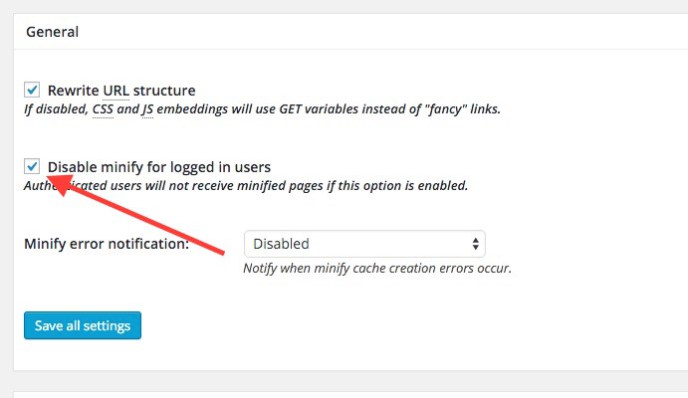
If you update either plugin, verify that your minify setting is still unchecked. Thrive Themes is working on a solution to this issue. Until, this is the only fix that you need.

Leave a Reply